Facebook Ad Checker: How to Check Any Page's Ads
A Facebook ad checker answers three questions about a business: is it running ads right now, which ads, and since when. You do not need a paid tool for any of them. Meta publishes the answer in the Ad Library, for free, without a login.
This guide shows the three ways in (from the Page, from the library, and by URL), what a check tells you using a real brand we checked today, how to use the same check to spot a fake advertiser, and what no checker can see.
What does a Facebook ad checker do?
It looks up a Page in the Meta Ad Library and shows the ads that Page is running across Facebook, Instagram, Messenger, Audience Network, WhatsApp and Threads. For each ad you get the creative, the copy, the link, a Library ID and the date it started running.
People search for an ad checker for different reasons:
- Competitor research. What is a rival running, and what have they kept running for months?
- Due diligence. Is the agency, brand or seller you are about to pay actually advertising, and has the Page been around long?
- Scam checks. Is the Page behind an ad you saw the real brand?
- Your own ads. Is the ad you launched live, and what does it look like to the public?
The same lookup covers all four.
How do you check if a Facebook Page is running ads?
From the Page. Open the business's Facebook Page and find the Page Transparency section (on desktop it sits under the About details; on mobile, scroll past About). Click See all. Under Ads from this Page you will see whether it is running ads, with a link to Go to Ad Library. Meta moves these labels now and then, so look for "transparency" if the wording differs.
From the Ad Library.
- Go to facebook.com/ads/library. No login needed.
- Choose a country. Pick the market you care about; "All" works but gets noisy.
- Leave the category on All ads.
- Start typing the brand name and pick the Page from the suggestions. Check the profile picture and follower count, because same-name Pages are common.
By URL. Once you have a Page's ID, the check is one link you can bookmark:
facebook.com/ads/library/?active_status=active&ad_type=all&country=US&view_all_page_id=PAGE_ID&search_type=page
Change country=US to another two-letter code, or to ALL, to check a different market.
If a Page has no active ads, the library says so. That is a result too: it means nothing is running in the country you picked right now.
What does a check actually tell you?
Here is a real one. On 10 November 2026 we checked Quince, the direct-to-consumer brand, for the US.
- How much they run. About 5,800 active ads. The library also showed the line "We're unable to display every ad from Quince at this time," which appears when a Page runs more ads than the page can list.
- When campaigns launched. Scrolling the first few dozen, the start dates bunch on a few days: 9 to 13 July, 31 August and early September 2026. Ads that launch together are usually one campaign or one test.
- Duplicates. Several cards carry a label such as "4 ads use this creative and text." That is Meta grouping identical copies, and it is a hint at how hard a brand is pushing one idea.
Three things are worth writing down from any check:
- The count of active ads. It tells you the scale of their testing.
- The oldest ads still running. Run time is the best public hint that an ad works, because brands do not keep paying for losers for months. We cover how to find them in How to Find the Longest-Running Facebook Ads.
- The newest ads. What started this week is what they are testing now.
How do you check if a Facebook ad is legit?
If an ad looks too good to be true, check the advertiser before you click "buy."
- Open the ad's Page. On the ad, tap the Page name. In the Ad Library, the Page name on each card is a link.
- Read Page Transparency. It shows when the Page was created, whether its name has changed, and the countries where the people who manage it are based. A Page created last month, renamed twice, selling a famous brand's products is a red flag.
- Compare with the brand's real Page. Search the brand in the Ad Library. The real one usually has years of history, a verified badge or a large following, and ads that link to the brand's own domain.
- Check the link. The domain under the ad copy should be the brand's real site, not a look-alike spelling.
If it is fake, report the ad from the menu on the ad itself.
Can you check a business's Instagram ads too?
Yes. The Ad Library covers Instagram, and the Platform filter can narrow results to Instagram only. In the Instagram app you can also open a profile, tap the menu, choose About this account, and follow Active ads to the library. You need to be logged in to Instagram for that route. More detail is in our Instagram Ad Library guide.
What can't any Facebook ad checker tell you?
Be wary of any tool that claims to show these for an ordinary commercial ad:
- Spend or ROAS. Meta publishes spend ranges only for social issue, electoral and political ads.
- Results. No clicks, conversions or cost per result.
- Targeting outside the EU and UK. Targeting summaries are published for ads delivered there, not for a US campaign.
- Stopped ads. Commercial ads leave the library when they stop, unless they were delivered in the EU (kept for a year) or are political or issue ads (kept for seven years).
Anything beyond that is an estimate. Our Meta Ad Library guide covers each field and limit in detail.
What happened to Facebook's old ad text checker?
Some people searching "Facebook ad checker" want the old Image Text Check tool, which graded how much text covered an ad image. Meta dropped the 20% text rule and retired that tool in September 2020. Ads are no longer rejected for text. Meta's image guidance still says images with less text tend to perform better.
Is there a free Facebook ad checker tool?
The Meta Ad Library is the free checker, and it is the source every paid tool reads from. It is good for a one-off look. It gets tedious when you want to check the same five competitors every week, because it shows only the present, does not keep ads that stop, and lists 300 near-identical copies as 300 cards.
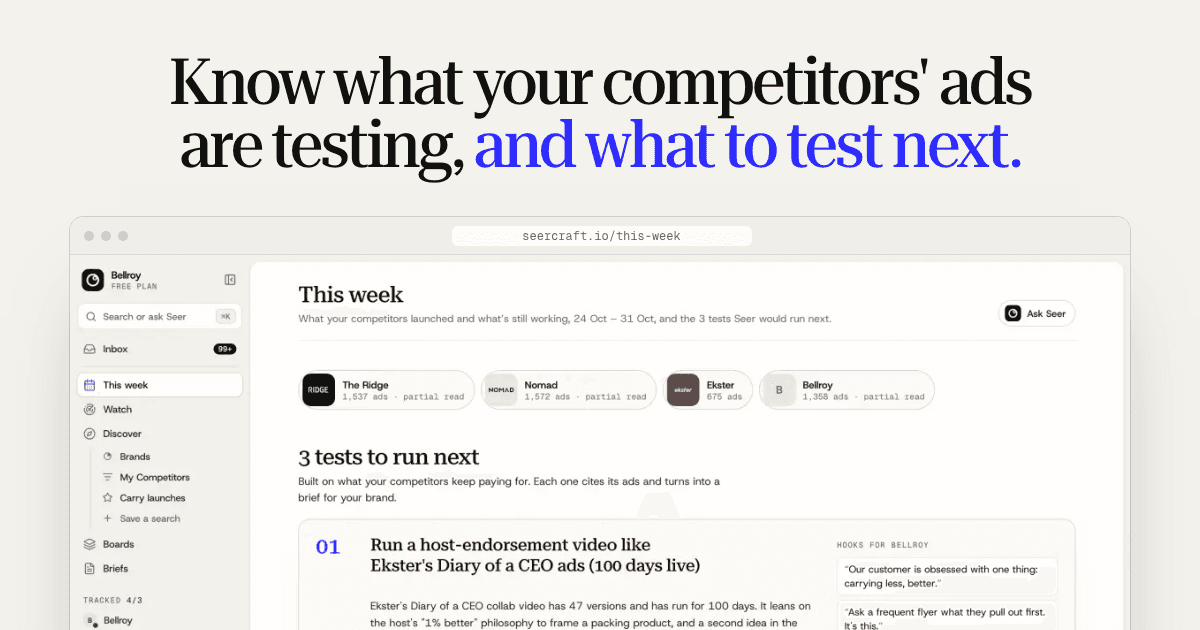
That weekly job is what Seercraft does. You add the brands you compete with and it checks them in the public Ad Library every day, keeps each ad after it stops, and groups copies of one creative into a single idea with a version count. Every Monday, Seer, the built-in analyst, sends three tests to run, each linked to the real ads behind it.
Check a competitor in Seercraft. Every plan starts with a 7-day free trial; see pricing for plans and limits.
Sources
- Meta Ad Library, checked live for the Quince example on 10 November 2026
- What is the Meta Ad Library and how do I search it? (Meta Help Center)
- About this account: active ads (Instagram Help Center)
- Facebook starts showing all ads a Page is running (MarTech)
- How to use the Page Transparency tool to spot fake Facebook pages (That's Nonsense)
- Facebook removes the 20% text limit on ad images (Search Engine Journal)